LONGER RAY5 10W · Volume 2
Inside the RAY5 — gantry, module, controller, and the open-frame problem
2.1 The frame and the motion system
Strip away the marketing and the RAY5 is a Cartesian plotter that happens to carry a laser instead of a pen. Its structure is aluminium extrusion — the ubiquitous slotted-profile stock that most desktop machines are built from — arranged as a rigid rectangle roughly 586 by 583 mm in plan and about 176 mm tall, weighing only a few kilograms assembled. Two of the profiles form fixed side rails; a third forms the moving cross beam that spans them. The whole thing bolts together from a flat-pack in an hour or so, and because it is open on every side, every belt, motor, and wire is visible and reachable — a maintenance convenience that is also, as the final section of this volume argues, a safety liability.
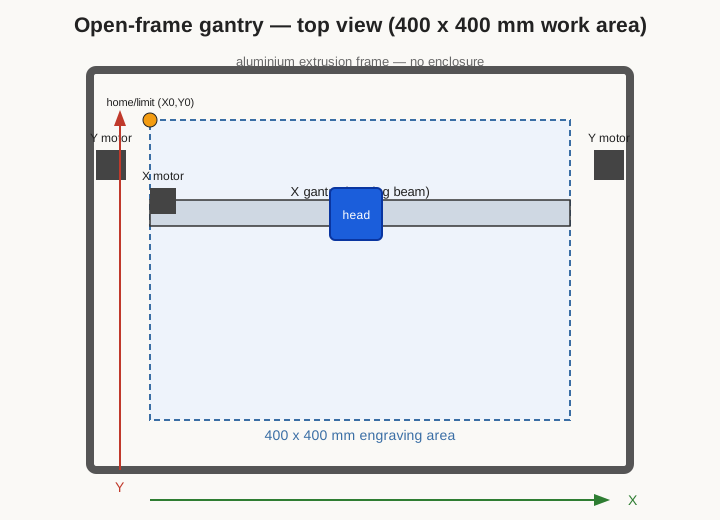
Motion is by stepper motor and toothed belt, the same arrangement found in a budget 3D printer, and it is worth being precise about which axis is which because the Roller attachment later hinges on it. The depth axis, Y, moves the entire cross beam toward and away from the operator; on the RAY5 this is driven by stepper motors working the two side rails so the beam stays square as it travels. The width axis, X, moves the laser carriage left and right along the cross beam, driven by its own stepper and belt. The third axis, Z, is not a driven axis at all in the ordinary sense: it is a manual height adjustment on the module mount, used for focusing, with a usable module-height range of up to about 47 mm to accommodate workpieces of different thicknesses. There is no automatic Z; the operator sets focus by hand for each job, a process described below and in the workflow volume.
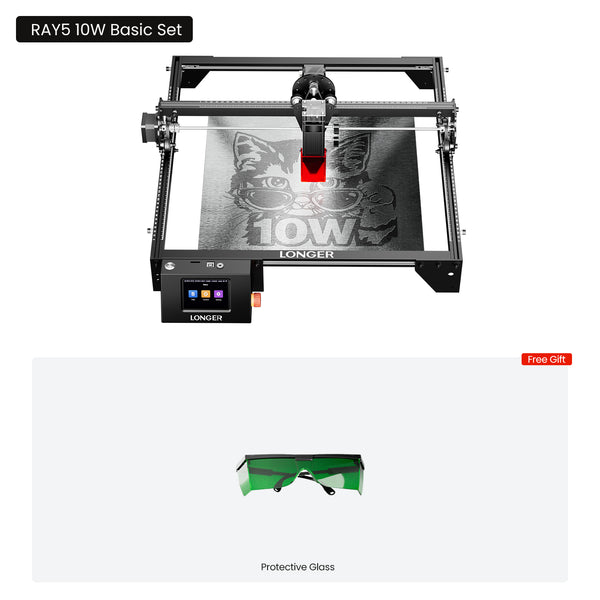
The usable engraving area is 400 by 400 mm — 15.75 inches square — which is generous for a machine this size and this price, and larger than many enclosed hobby lasers offer. Rated motion performance is up to roughly 10,000 mm/min of travel speed with positioning resolution around 0.01 mm, though as always the useful engraving and cutting speeds are far lower than the maximum slew rate and are set by the material rather than the motors. The frame’s rigidity is adequate rather than exceptional; at high raster speeds a lightly built open gantry can show a little ringing or ghosting in fine detail, and the practical fix — as with any belt-driven machine — is to keep belts properly tensioned and to back off speed when chasing the finest work.
2.2 Homing, limits, and the coordinate system
For a machine to place a design accurately it must know where its axes are, and for a machine to protect itself it must know where they end. The RAY5 provides limit switches at the axis ends and supports a homing routine: on command the gantry drives gently toward its home corner until the switches trip, establishing a repeatable origin. Homing matters for more than tidiness. It lets the operator set a job’s position once and return to it exactly, it underpins features like restarting an interrupted job, and it defines the coordinate frame that the Roller attachment will later borrow. A machine that has homed knows that the corner is (0,0) and that the far extents are its soft limits; without a home reference every job is positioned by eye.
The distinction between machine origin and job origin is worth drawing out, because it trips up newcomers. Homing establishes the machine coordinate frame — a fixed corner the controller always measures from. Where a job lands, however, is usually set relative to a user-chosen origin: the operator jogs the head to a corner or centre of the workpiece and tells the software “start here.” GRBL-based machines like the RAY5 support both absolute positioning from the homed corner and this relative, current-position mode, and choosing sensibly between them is the difference between a design that lands where intended and one that flies off to a machine coordinate the operator never meant. For repeatable production of the same part, absolute positioning against the homed origin wins; for one-off pieces dropped anywhere on the bed, current-position mode is quicker.
Framing is the everyday companion to homing. Before committing a burn, the operator has the machine trace the bounding rectangle of the design at low, harmless power — the head runs a lap around where the job will land — so the workpiece can be nudged until the design sits where it should. On the RAY5 this can be driven from the software on a connected computer or, usefully, directly from the machine’s own touchscreen when running a job offline. Framing is cheap insurance against engraving a logo half off the edge of a good piece of walnut.
2.3 The combined-diode 10 W module and fixed focus
The heart of the machine is the laser module hanging from the X carriage, and it is worth understanding as its own small optical system. Inside are two blue laser diodes emitting at roughly 445 to 450 nm, each producing on the order of 5 to 6 W of optical power, together with a beam-combining optic that overlaps their outputs and a focusing lens that brings the combined beam to a spot rated at about 0.06 by 0.06 mm. LONGER identifies this module by its own part designation and quotes a measured optical output in the 10 to 11 W range. The module is air-cooled: a fan pulls air through the housing to carry away the substantial waste heat that any diode laser produces, and running the module without that airflow will cook the diodes and shorten their life dramatically. Diode lifetime is finite in any case — these are consumable emitters that dim gradually over thousands of hours — but heat is the single biggest accelerator of that decline, which is why the fan is not optional and why the module should be given a moment to keep running after a job while it cools.
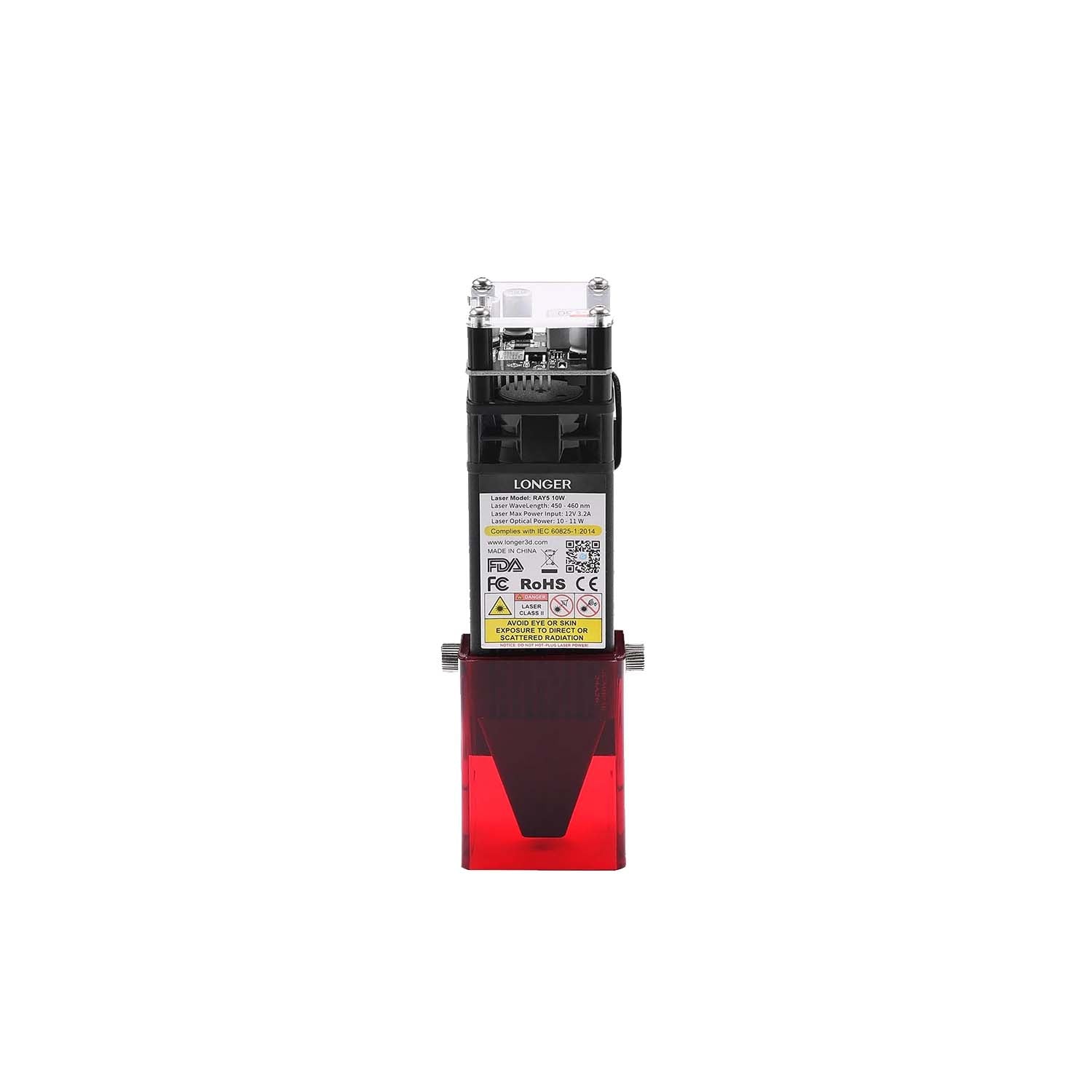
The RAY5 10 W module is fixed focus, and this is a defining and slightly polarizing design choice worth explaining carefully. In a fixed-focus laser the lens position relative to the module body never changes; the beam always comes to its tightest waist at one particular distance below the nozzle — here corresponding to a 50 mm focal length. There is no focus knob and no motorized autofocus. To bring a workpiece into focus, the operator does not move the lens; the operator sets the air gap between the nozzle and the material’s surface to the one correct value, then locks the whole module at that height on the Z mount. LONGER supplies a spacer — a small gauge block or a fixed-length standoff — for exactly this: rest it between the nozzle and the work, slide the module down until it just meets the spacer, tighten the mount, remove the spacer, and the beam is in focus. It is a crude method compared with a motorized autofocus, but it is fast, repeatable, and has nothing to drift or fail.
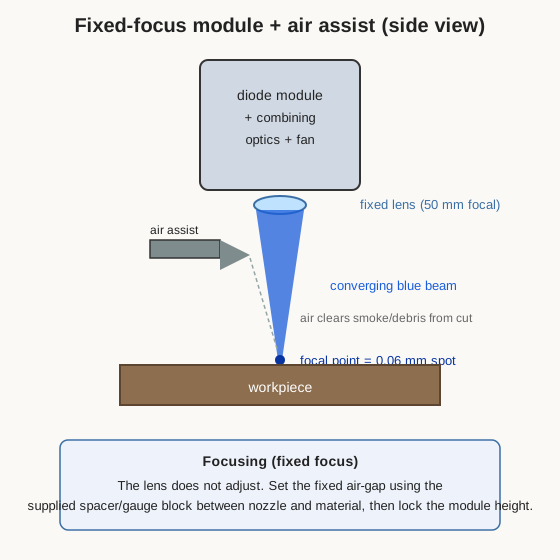
The compromise of fixed focus shows up with thick or uneven material. Because focus is a single air gap, engraving a domed or stepped surface, or cutting deep into thick stock where the surface effectively recedes from the lens as material is removed, means part of the job runs slightly out of focus. For flat sheet goods — the overwhelming majority of what this machine does — fixed focus is a non-issue and arguably a virtue, because there is no focus adjustment to get wrong between jobs. For genuinely three-dimensional work it is a limitation to be aware of, one the CO2 laser with its longer working range handles more gracefully.
2.4 Air assist
Air assist is a stream of air blown coaxially down onto the point where the beam meets the material, and it does two things that materially improve results. It pushes the plume of smoke and vaporized material out of the beam’s path — smoke in the beam scatters and absorbs the light, robbing the cut of power and fogging the lens — and it cools the immediate cut zone and helps suppress flare-ups on flammable material. The visible payoff is cleaner, lighter cut edges on plywood and acrylic and less scorching and soot around engravings. On the RAY5, air assist is an add-on rather than standard equipment: an external air pump feeds a hose to a nozzle at the module, and it is one of the more worthwhile accessories to fit, especially for anyone intending to cut rather than only engrave. The module’s nozzle geometry is designed to direct that air tightly around the beam exit, which is also part of why the nozzle-to-work gap that sets focus matters — too large a gap and the air assist disperses before it reaches the cut.
2.5 The 32-bit controller, the touchscreen, and offline control
Older and cheaper hobby lasers often ran 8-bit control boards that struggled to buffer fast, detailed toolpaths and would stutter on dense raster engraving. The RAY5 uses a 32-bit controller built around an ESP32 — a widely used microcontroller running at 240 MHz with built-in wireless — running GRBL-family firmware. GRBL is the open-source motion-control firmware that interprets G-code and steps the motors, and it is the reason the machine works out of the box with the standard hobby-laser software ecosystem. The extra processing headroom of a 32-bit board matters in practice: it keeps the motion buffer fed during complex jobs so the head moves smoothly instead of hesitating, and it makes higher-resolution raster engraving practical.
GRBL also means the machine is configurable in a way closed appliances are not. Its behaviour is governed by a set of numbered settings — steps-per-millimetre for each axis, maximum feed rates, acceleration, homing direction and speed, soft-limit extents, and so on — that are stored on the board and can be read and changed over the USB connection with a simple console. Most owners never need to touch them, but two are worth knowing about. The steps-per-millimetre values ($100 for X, $101 for Y) calibrate the belts, and the Y value in particular is what the Roller attachment overrides to convert linear travel into rotation, as the workflow volume details. And the maximum-power setting, $30, defines the number that “100 %” corresponds to in G-code, which matters when moving files between LaserGRBL, LightBurn, and the offline card so that a job burns at the intended intensity everywhere. This openness is a large part of why a GRBL machine ages gracefully: firmware and settings are inspectable and adjustable rather than locked away.
Sitting on the control box is a 3.5-inch colour touchscreen, and it is more than a gimmick. It turns the RAY5 into a machine that can run without a tethered computer. Designs are prepared on a PC in software, exported to G-code, and copied to a microSD/TF card; the card goes into the machine, and the touchscreen is used to select the file, jog the axes, frame the job, set or confirm power and speed where the format allows, start, pause, and stop — all standalone. This offline capability is genuinely convenient: the machine can be tucked away from the computer, a long engraving can run without tying up a laptop, and there is no risk of a sleeping PC or a dropped USB connection ruining a two-hour raster. The ESP32’s wireless also enables app and Wi-Fi control for sending jobs and monitoring, and a direct USB connection to a computer remains available for driving the machine live from LightBurn or LaserGRBL. In short, there are several routes in — USB tether, Wi-Fi/app, and offline microSD — and the operator can pick whichever suits the job. The software side of that workflow is the subject of the next volume.
2.6 The open-frame problem — glasses and a shield, not a lid
Everything above describes a capable, well-specified little machine. What it does not have is an enclosure, and that omission is the most important safety fact about the RAY5. This is a Class 4 laser product: its beam, and even diffuse reflections of its beam off a shiny workpiece, can cause permanent eye injury, and its focused spot will burn skin and ignite material. On an enclosed laser a closed, opaque, interlocked lid contains the light and, with an interlock, cuts power if opened. The RAY5 has none of that. The beam is out in the open room.
Two things make the open frame acceptable to work with, and both are the operator’s responsibility rather than the machine’s. The first is eye protection: purpose-made laser safety glasses rated for the diode’s ~445 to 450 nm wavelength, worn by everyone in the room whenever the laser can fire. Ordinary tinted glasses, welding shades, or sunglasses are not adequate and can be dangerously misleading; the glasses must carry an optical-density rating that specifically covers blue around 450 nm. LONGER supplies a pair of protective glasses with the machine, and they should be treated as the minimum, not a token. The second is a physical shield: at minimum the small acrylic flap that clips over the laser nozzle to block the direct downward beam and its nearby scatter, and better still an enclosure the owner builds or buys around the machine — a box, a hood, or a curtain of laser-blocking material — that both contains stray light and channels smoke to an exhaust. The bright blue glow that leaks from an open diode laser during a job is not merely unpleasant to look at; it is exactly the light the glasses exist to stop.
Because the frame is open, the machine also offers no containment for the other two hazards it produces: smoke and fire. Engraving and cutting release fumes that must be ducted outside or through suitable filtration, and a laser cutting flammable material must never be left unattended, because an open flame on the workpiece has nothing around it to contain a fire. These points are developed fully in the safety volume, but they belong here too, because they are direct consequences of the machine’s mechanical design. The RAY5’s openness is what makes it cheap, light, and pleasant to tinker with; it is also what shifts the entire burden of containment onto the person running it. A capable maker can meet that burden easily — glasses, a shield or enclosure, ventilation, and attention — but it has to be met deliberately, every single time the laser is armed.
Comments (0)